Static screenshots are killing your portfolio. Do this instead
PortfolioUpdated AUG 27, 20263 min
Your portfolio is a page of screenshots. So is everyone else's. On a feed that moves, a still image is the easiest thing in the world to scroll past.
Why a few seconds of motion works
Motion buys you the extra second it takes someone to see more than one screen. And the same file works in three places at once: the work page of your portfolio, the case study, and the deck you send a client.
Do this instead
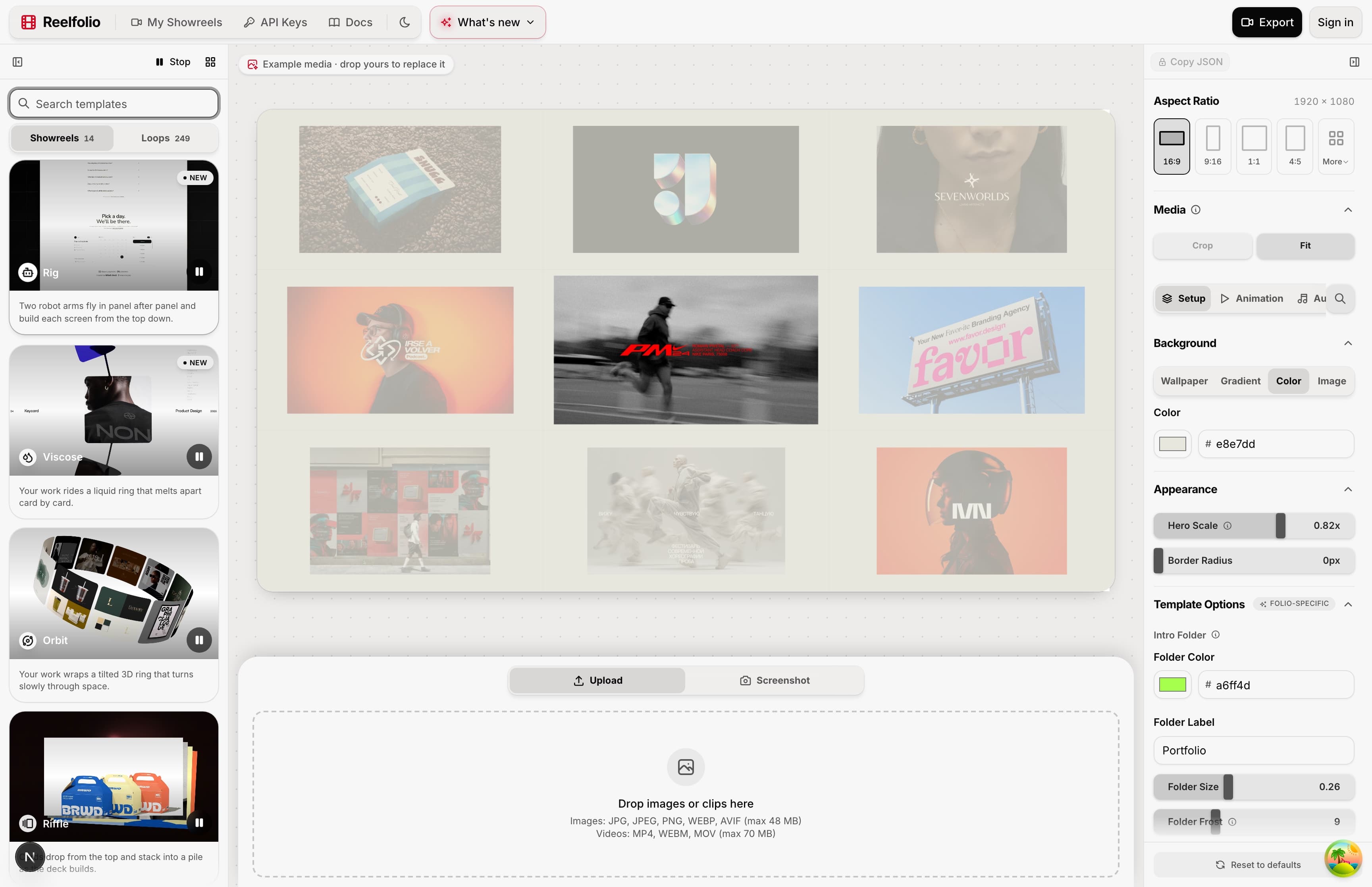
Take the screenshots you already have and turn them into a short reel. Here's one made in Reelfolio, with no editing involved:
No timeline, no keyframes, no After Effects. You drop in your screenshots or screen recordings, pick an animation, and export.
What it actually takes
- 01Upload your screenshots or screen recordings.
- 02Pick a template from the library.
- 03Change the background, motion or format if you want to.
- 04Export 16:9, 9:16, 1:1 and the rest, up to 4K.
Where a reel beats a screenshot
The same file does a different job in each of these places:
- Dribbble, X and LinkedIn, where a still is easy to scroll past and a few seconds of motion isn't.
- Case studies on Behance or your own site, where a reel between sections shows the product working.
- Pitch decks. Embed the MP4 in Keynote, Pitch or Figma Slides so people see the product move instead of a frozen frame.
- Client proposals, where a reel of the working interface makes the case before anyone reads a word.
It works with whatever you already have. Export mockups from Figma, Sketch or Adobe XD, or just use plain screenshots and screen recordings.
I'm not a video editor
You don't need to be. The template carries the animation. If you can pick a screenshot, you can make a reel.
If you haven't settled on a tool yet, the roundup of tools for a design portfolio video covers the alternatives and what each one costs.
“Reelfolio makes it effortless to turn our thousands of screenshots into clean, engaging X videos. I used to do this manually with Screenstudio, but Reelfolio is dramatically faster and simpler.”

Rob Austin
@ausrobdev
“Simple to use, incredibly efficient, and perfect for turning our design work into engaging presentations and showcase videos.”

Ketan Pandey
@ketandesign
One plan, every reel
Reelfolio is $12 a month, or $108 a year. Render as many reels as you want, whenever a project needs one, and cancel when you are done.
Start with the eight or ten shots you're proudest of. That's usually enough for thirty seconds, and thirty seconds is all anyone gives you.
Read more
See all posts
ToolsAUG 27, 20264 min
The best tool for creating a design portfolio video
Five tools for turning design work into a portfolio video, what each one costs in time and money, and which to open first.


ComparisonsUpdated AUG 27, 20267 min
Reelfolio vs Jitter: which should designers use in 2026?
Jitter is a motion design editor. Reelfolio turns your screenshots into a finished reel without one. Comparison table, honest pros and cons, and a clear verdict inside.
ComparisonsUpdated AUG 27, 20267 min
Reelfolio vs After Effects: do you need a timeline to show your work?
After Effects can make anything. Reelfolio makes one thing in under a minute: a polished reel of your design work. An honest comparison with a table, real pricing, and a verdict.
Pick a template. Watch it run.
Preview the motion, then send your screenshots to Reelfolio and ship the reel in about a minute.